Label Printing in Total Control Premier
Opening the Label Manager Applet
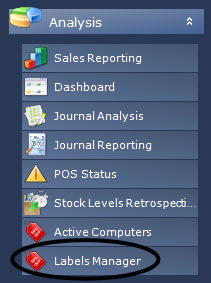
The Label Manager Applet is where labels can printed and label queues can have products added and removed.
The default location for the applet is under Analysis > Label Manager
Adding Products to Printer Queue
There are two ways to add products to a label queue in Total Control Premier.
Adding from Product Maintenance Applet
- Find the product you want to add to the label queue within the Product Maintenance applet.
- Right Click the product you want to add, select 'Add to Print Queue', the label queue name (the example being 'Test') and select a quantity.
Adding from Label Manager Applet
- Edit the label queue you want to add products to by either double clicking to edit or selecting the queue and clicking Edit Queue' on the top navigation bar.
- When the label queue is opened for editing we can add and remove from the queue.
Printing a Queue from the Label Manager Applet
To print a label queue once you have added products select the queue you would like to print and then click 'Print Queue'.
This will then load Bartender and print the products you have added to your select queue.
Related Articles
Total Control Label Printing
Label Printing Options Total Control Premier has 4 options for producing labels however only two are available to use. Our recommended method is to use the Bartender Solution Label Devices Device Type Bartender Uses a 3rd party application allowing ...Label printing options
Introduction Label printing is provided by integrating Total Control Premier with Bartender. Bartender is a powerful labeling application developed by Seagul Scientific - https://www.seagullscientific.com. Bartender allows design of labels to your ...Total Control Premier Release Notes
Pre-Requisites, 3rd Party Applications and Hardware Compatibility Known Issues V2.20.9554.18336 Release notes Issue No. Title Origin Notes TCW-4216 MFA for TCP web Feature TCW-4205 Customer record Dashboard Feature TCW-4222 Stocktake notes and ...Total Control Premier Pre-Requisites, 3rd Party Applications and Hardware Compatibility
Total Control Premier Pre-Requisites, 3rd Party Applications and Hardware Compatibility This document is intended to show details of operating systems and third party applications that Total Control Premier requires either as a requirement or as an ...Printing Labels from Cloud Hosted Total Control Premier
The Universal Print Driver for Total Control Premier produces labels as PDF files which can then be printed using a printer attached to the computer; the printer can be physically attached or can be a network printer. The instructions below detail ...